How to Verify a Digitally Signed Sworn Translation in Spain
A step-by-step guide to checking the electronic signature with VALIDe, Spain's official verification service, with screenshots.
If you've received a sworn translation as a digitally signed PDF, there's something important to know before submitting it to a Spanish consulate, immigration office or lawyer: the digital signature is part of the electronic file itself. Printing, scanning, converting or combining PDFs can affect the signature or remove the information needed to verify it.
Need a sworn translation for Spain delivered as a verifiable, digitally signed PDF? Send your documents with your request.
Start Your Translation RequestFor lawyers, advisors and receiving offices
You are welcome to send this page to a client, or to the office that is reviewing the translation. In short:
- The signature can only be checked in the original PDF file, not in a printout, scan or screenshot.
- Anyone can check it free of charge, without a certificate or an account, using VALIDe, the Spanish government's official verification service.
- A valid result shows "Firma válida" and the name of the sworn translator who signed it.
- If verification fails, ask for the exact error message and contact the sworn translator before changing the file.
The official step-by-step tutorial is also available on Spain's electronic signature portal: Validar firma (firmaelectronica.gob.es).
Why does this matter?
A Spanish sworn translation normally includes the translator's official certification, signature and stamp. When delivered electronically, the translator may also apply a verifiable digital signature. This allows the recipient to check the electronic signature and whether the document has been modified since it was signed.
Before you start
Keep the original PDF exactly as you received it. Do not open it and "Save as", print it to PDF, compress it, merge it with other files or rename it with an online tool. Any of these can remove or break the embedded signature. If you need to send the translation to someone, forward the original file as an attachment.
How to verify the signature with VALIDe, step by step
VALIDe is a free online service run by the Spanish government. It works in any web browser and does not require a digital certificate, an account or any software installation. The screenshots below use a fictitious specimen document; personal identification numbers have been hidden.
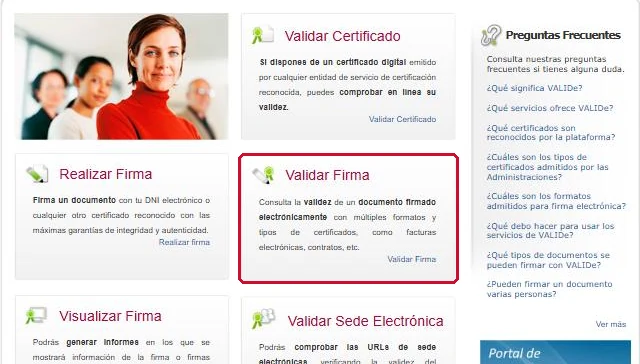
Step 1. Open VALIDe and choose "Validar Firma"
Go to valide.redsara.es and click Validar Firma ("Validate signature"). Do not choose "Validar Certificado", which checks a certificate on its own rather than a signed document.
Step 2. Upload the PDF and enter the security code
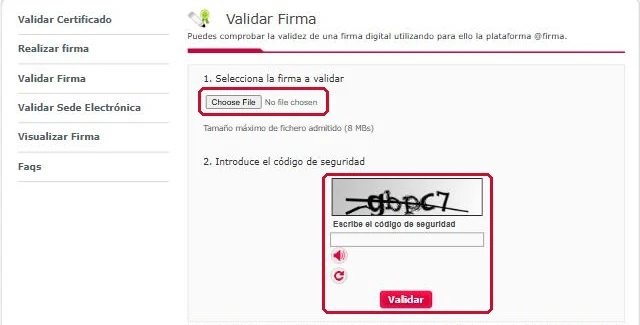
Under 1. Selecciona la firma a validar, click Choose File (or Seleccionar archivo) and select the original signed PDF. The maximum file size is 8 MB. Under 2. Introduce el código de seguridad, type the characters shown in the image, then click Validar.
Step 3. Read the result
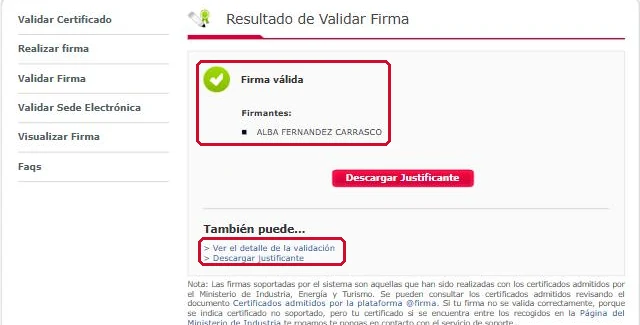
If the signature is correct, VALIDe shows a green tick with "Firma válida" ("Valid signature") and lists the signer under Firmantes. For a sworn translation, this should be the name of the sworn translator.
Step 4. Check the validation details
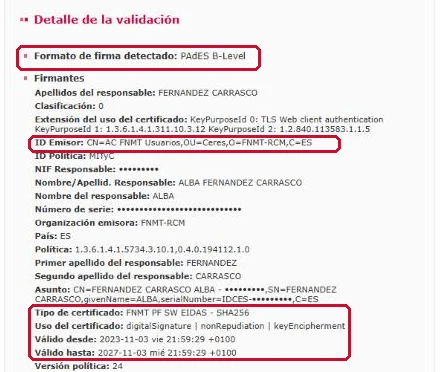
Click Ver el detalle de la validación ("View validation details") to see more information about the signature, including:
- Formato de firma detectado: the signature format, such as PAdES (a standard format for signed PDFs).
- ID Emisor and Organización emisora: the certification authority that issued the signer's certificate, for example FNMT-RCM, Spain's Royal Mint.
- Nombre/Apellid. Responsable: the full name of the signer.
- Tipo de certificado and Válido desde / Válido hasta: the type of certificate and its validity period.
Step 5. Download the verification report (optional)
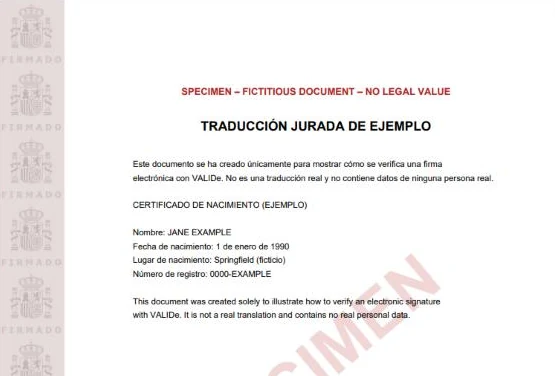
Click Descargar justificante to download a PDF report of the verification. It contains the document with a printable signature stamp along the margin, showing who signed it and that it was verified through VALIDe. This report can be useful if a lawyer or office asks for proof that the signature was checked, but it does not replace the original signed PDF.
Checking the signature in a PDF reader
You can also open the file in a PDF application that supports digital-signature verification and look at its signature panel, which shows the signer and whether the document has been modified since it was signed. Some PDF readers may display a warning such as "validity unknown" when they do not recognise the certification authority. That does not necessarily mean the signature is invalid. If the receiving authority asks for it, VALIDe is the official reference.
Common mistakes to avoid
Watch out for these:
- Scanning a printed translation. A scan may show the translator's stamp and signature visually, but it does not preserve the original PDF's embedded digital signature.
- Combining several signed documents. Some PDF-merging processes can remove or invalidate electronic signatures.
- Editing a signed PDF. Changes after signing may affect verification.
- Sending screenshots instead of the original PDF. A screenshot is not a substitute for a digitally signed document.
What if verification fails?
A verification error does not automatically mean the translation is invalid. It may relate to the file, the signature, the verification software or another technical issue. First, make sure you are uploading the original PDF and not a copy that was printed, scanned, merged or edited. If the error persists:
- Note or screenshot the exact error message.
- Do not try to repair or modify the file yourself.
- Contact your sworn translator and send the error together with the file you tried to verify.
Where appropriate, the translator can check the original signed PDF and provide a fresh electronically signed copy.
About the translator
This guide was written by Alba Fernández Carrasco, an English–Spanish sworn translator appointed by the Spanish Ministry of Foreign Affairs (MAEC No. 8981).
Common Questions
Is VALIDe free, and do I need a digital certificate to use it?
VALIDe is a free service from the Spanish government. You do not need a digital certificate, an account or any software to verify a signed document. You only upload the file and type a security code.
Does printing a digitally signed sworn translation keep the digital signature?
No. The digital signature is part of the electronic PDF file. A printout shows the translator's stamp and signature visually, but the embedded digital signature can only be verified in the original PDF.
Can I merge my signed translation with other documents into one PDF?
It is safer not to. Some PDF-merging processes can remove or invalidate electronic signatures. Submit the signed PDF exactly as you received it unless the authority tells you otherwise.
What does "Firma válida" mean in VALIDe?
It means VALIDe has checked the electronic signature in the file and found it valid. The result also lists the signer, which for a sworn translation should be the sworn translator.
Does a verification error mean my translation is invalid?
Not automatically. It may relate to the file, the signature, the verification software or another technical issue. Ask for the exact error and contact your sworn translator.
Can a lawyer or immigration office check the signature themselves?
Yes. Anyone who has the original PDF can verify it with VALIDe. If they need proof of the check, VALIDe can generate a downloadable verification report (justificante).
Last reviewed November 2026 by Alba Fernández Carrasco, MAEC-appointed sworn translator-interpreter, No. 8981.